Configuration of Enrollment Fees
To set up the annual membership fee, navigate to Administration → Economic settings then expand the "Student Membership Dues" and enter:
- Membership fee name: name of the school membership card
- Registration fee € *: cost of school membership card
- Period (Year(s)): duration in years of the school's membership card (indicate a number of years equal to 0 in the case of a life membership card)
- Sellable from: specify from when the school membership card is sellable
- Saleable up to: specify until when the school membership card is saleable
Click the green button with the "+" to add the membership fee.
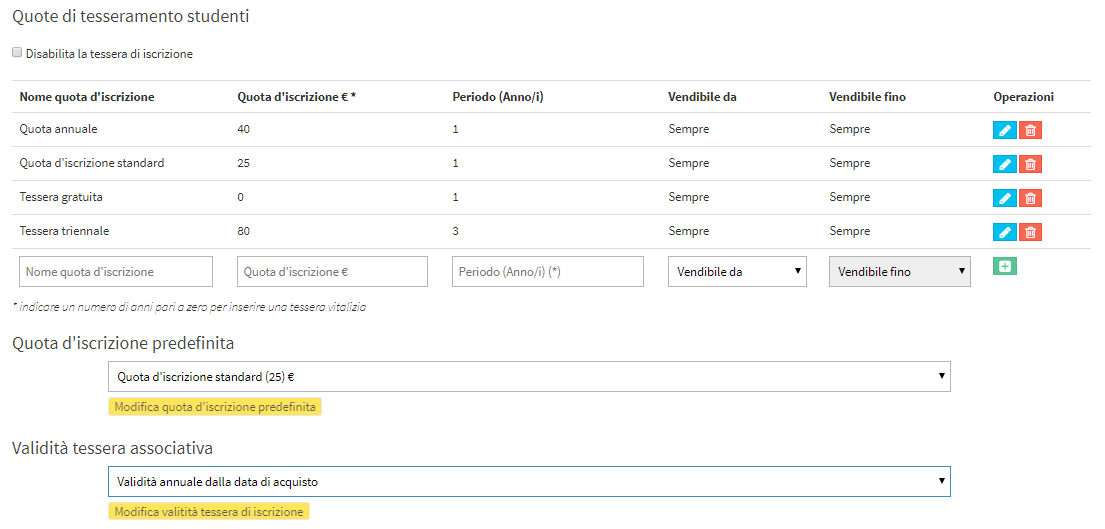
It will be possible to add multiple membership fees and decide which one is the default:

It will also be possible to choose the validity of the membership fee between:

- Linked to the calendar year: The Registration Fee will be valid from January 01 to December 31 of the current year.
- Linked to the Educational Year: The Fee will be valid for the duration of the Educational Year.
- Valid for one year from the date of purchase: The Share will be valid for 365 days from the date of purchase.
Pingback: Enrolling a student in an individual course - The Wiki of ScuolaSemplice
Pingback: Student enrollment in a group course - The Wiki of ScuolaSemplice
Pingback: 2 - General Configuration - The Wiki of ScuolaSemplice